Connecting Your Motor Controller to ROS 2: Writing a ros2_control Hardware Interface

Hands-on · Robotics software · ~14 min read
Every ROS 2 tutorial stops exactly where the robot begins: the simulation works, RViz looks great, and then you're staring at your own motor controller on the bench wondering how /cmd_vel is supposed to reach it. The missing piece is a ros2_control hardware interface, about 200 lines of C++ that turn your serial-connected board into joints any standard ROS controller can drive. We've written these interfaces for our own BLDC controllers and for customer machines; this is the article version: the architecture, the wire protocol, the full annotated implementation, and the timing/units/watchdog details that decide whether it actually works.
This is also the natural sequel to our FOC article: there we built the firmware inside the drive. Here we put that drive on a robot.
1 · Where ros2_control sits: and why it isn't topics
The first thing to unlearn: in the real-time control path, nothing is a topic. There are ROS topics at the edges (/cmd_vel in, /joint_states and /odom out), but the loop itself runs over shared memory: controllers and your hardware exchange raw doubles through exported interfaces, not DDS messages.
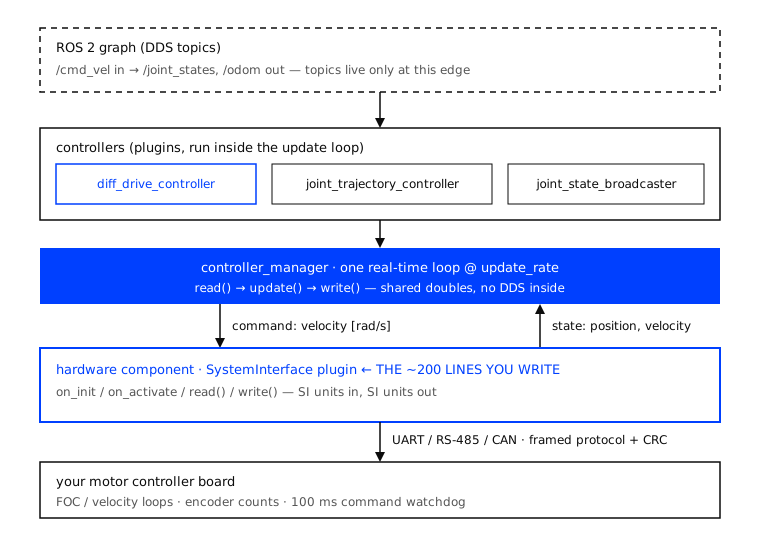
Three layers matter:
- Controllers (
diff_drive_controller,joint_trajectory_controller,joint_state_broadcasterand others) are plugins that consume state interfaces and produce command interfaces. You configure them; you rarely write them. - The controller_manager owns the loop. At a fixed
update_rateit callsread()on your hardware,update()on every active controller, thenwrite()on your hardware. - The hardware component, your code, implements
read()andwrite()and exposes the joints. One plugin class, loaded from your URDF.
The contract is beautifully narrow: controllers see velocity commands and position/velocity states in SI units (radians, rad/s). Your job is to be the honest translator between those doubles and whatever your electronics speak.
2 · The contract: a SystemInterface and its lifecycle
A hardware component subclasses hardware_interface::SystemInterface and implements a handful of lifecycle callbacks plus the two hot-path methods:
| Method | Called | What you do there |
| --- | --- | --- |
| on_init | once, at load | read parameters from the URDF, size your state/command vectors |
| on_configure | on configure | open the serial port / CAN socket |
| on_activate | before the loop starts | enable the drive, zero encoders, reset stale commands |
| read() | every cycle | poll the board, convert counts to SI, fill the state vectors |
| write() | every cycle | convert SI to counts, frame, send |
| on_deactivate | on stop | command zero velocity, disable the drive |
Return values are part of the contract: return_type::ERROR from read()/write() tells the controller_manager the hardware is gone, it stops the controllers instead of integrating garbage. Use it for persistent failures, not a single lost frame (more on that in the gotchas).
3 · Declaring the hardware in the URDF
The <ros2_control> tag is where your plugin, its parameters, and the exposed interfaces are declared:
<ros2_control name="DiffBotSystem" type="system">
  <hardware>
    <plugin>segev_drivers/DiffBotSystem</plugin>
    <param name="device">/dev/ttyUSB0</param>
    <param name="baud_rate">115200</param>
    <param name="counts_per_rev">4096</param>
    <param name="cmd_watchdog_ms">100</param>
  </hardware>

  <joint name="left_wheel_joint">
    <command_interface name="velocity"/>
    <state_interface name="position"/>
    <state_interface name="velocity"/>
  </joint>
  <joint name="right_wheel_joint">
    <command_interface name="velocity"/>
    <state_interface name="position"/>
    <state_interface name="velocity"/>
  </joint>
</ros2_control>
Everything here arrives in your code through info_: the joints with their interfaces, and info_.hardware_parameters as strings. This is deliberate, the same compiled plugin drives a different machine by editing XML, not C++.
4 · Electronics first: design the wire protocol before the C++
This is the step the software tutorials skip, and it's where robots actually fail. Our rules for the link between the SBC and the drive:
Binary frames with a CRC, not printf. A fixed frame (sync byte, length, command, payload, CRC-16) is parseable in a deterministic number of cycles on the MCU and survives a noisy cable. Two frames are enough for a differential robot:
Host -> Board   SET_VEL : [0xAA][len][0x01][int32 vL][int32 vR][crc16]   (counts/s)
Board -> Host   STATE   : [0xAA][len][0x81][int32 pL][int32 pR]
                          [int32 vL][int32 vR][u8 status][crc16]        (counts, counts/s)
The board reports its own velocity. Differentiating encoder counts on the PC side at 100 Hz gives you noise, not velocity. The drive already runs a velocity loop (tuned the way we described here) with a clean estimate at kilohertz rates, ship that estimate in the STATE frame.
A command watchdog lives in the firmware. If no valid SET_VEL arrives within ~100 ms, the board stops the motors on its own. The cmd_vel_timeout in diff_drive_controller only helps while the software stack is alive; a kicked-out USB cable is exactly the case it can't cover. The wire must fail safe.
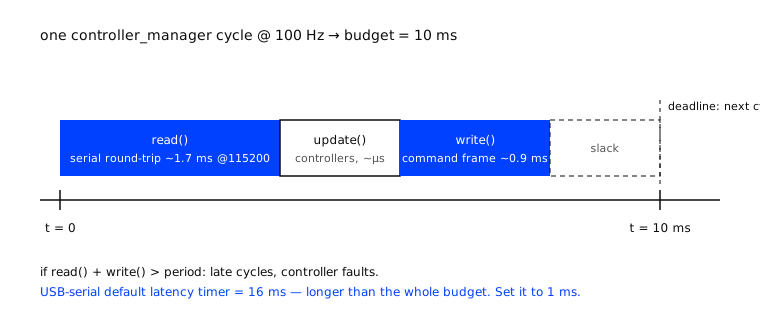
Do the baud math before choosing the loop rate. At 115200 baud, one byte ≈ 87 µs. A 21-byte STATE frame plus a 13-byte SET_VEL is ~3 ms of bus time per cycle: comfortable at 100 Hz, hopeless at 1 kHz. That's the real reason hobby robots run their ros2_control loop at 50-100 Hz and leave the kilohertz loops inside the drive, where they belong. Need many axes or microsecond synchronization? That's EtherCAT territory: different article, same discipline.
And the unit conversions, written once and tested, because every sign error in the robot traces back here:
5 · The implementation: annotated and trimmed
The complete class, with logging and includes stripped for readability. This follows the structure of the official demos (ros2_control_demos, example 2) and targets a current ROS 2 distro, the API still moves between releases, so diff against the demo for yours:
class DiffBotSystem : public hardware_interface::SystemInterface {
public:
  CallbackReturn on_init(const hardware_interface::HardwareInfo & info) override {
    if (SystemInterface::on_init(info) != CallbackReturn::SUCCESS)
      return CallbackReturn::ERROR;

    // URDF params arrive as strings, parse once, here.
    device_   = info_.hardware_parameters["device"];
    baud_     = std::stoi(info_.hardware_parameters["baud_rate"]);
    cpr_      = std::stod(info_.hardware_parameters["counts_per_rev"]);

    pos_.assign(info_.joints.size(), 0.0);
    vel_.assign(info_.joints.size(), 0.0);
    cmd_.assign(info_.joints.size(), 0.0);
    return CallbackReturn::SUCCESS;
  }

  std::vector<hardware_interface::StateInterface> export_state_interfaces() override {
    std::vector<hardware_interface::StateInterface> s;
    for (size_t i = 0; i < info_.joints.size(); i++) {
      s.emplace_back(info_.joints[i].name, "position", &pos_[i]);
      s.emplace_back(info_.joints[i].name, "velocity", &vel_[i]);
    }
    return s;  // controllers will read these doubles directly
  }

  std::vector<hardware_interface::CommandInterface> export_command_interfaces() override {
    std::vector<hardware_interface::CommandInterface> c;
    for (size_t i = 0; i < info_.joints.size(); i++)
      c.emplace_back(info_.joints[i].name, "velocity", &cmd_[i]);
    return c;
  }

  CallbackReturn on_configure(const rclcpp_lifecycle::State &) override {
    if (!port_.open(device_, baud_)) return CallbackReturn::ERROR;
    return CallbackReturn::SUCCESS;        // port is owned for the node's life
  }

  CallbackReturn on_activate(const rclcpp_lifecycle::State &) override {
    port_.send_enable();                   // energize the drive
    port_.request_zero();                  // encoder zero = pose zero
    std::fill(cmd_.begin(), cmd_.end(), 0.0);  // never replay a stale command
    return CallbackReturn::SUCCESS;
  }

  return_type read(const rclcpp::Time &, const rclcpp::Duration &) override {
    StateFrame f;
    if (!port_.poll_state(f, /*timeout_ms=*/5)) {
      if (++miss_ > 5) return return_type::ERROR;   // persistent loss -> stop
      return return_type::OK;                       // single miss -> hold last
    }
    miss_ = 0;
    for (size_t i = 0; i < pos_.size(); i++) {
      pos_[i] = 2.0 * M_PI * f.pos_counts[i] / cpr_;     // counts -> rad
      vel_[i] = 2.0 * M_PI * f.vel_counts[i] / cpr_;     // board's estimate
    }
    return return_type::OK;
  }

  return_type write(const rclcpp::Time &, const rclcpp::Duration &) override {
    int32_t v[2];
    for (size_t i = 0; i < cmd_.size(); i++) {
      double clamped = std::clamp(cmd_[i], -max_w_, max_w_);  // respect limits
      v[i] = static_cast<int32_t>(clamped * cpr_ / (2.0 * M_PI));
    }
    port_.send_velocity(v[0], v[1]);   // one frame, CRC'd, feeds the watchdog
    return return_type::OK;
  }
  // on_deactivate / on_cleanup: quiet the drive / close the port, symmetric.
};

PLUGINLIB_EXPORT_CLASS(segev_drivers::DiffBotSystem,
                       hardware_interface::SystemInterface)
Things worth noticing, because they're the difference between demo code and field code: the stale-command reset in on_activate (the #1 cause of robots lurching at startup), the miss counter in read() (one corrupted frame must not kill the controllers), and the clamp before conversion in write() (the URDF promised rad/s; the board has its own opinion about maximums).
6 · Controllers: configuration, not code
With the hardware interface exporting clean joints, the rest is YAML:
controller_manager:
  ros__parameters:
    update_rate: 100        # Hz, must clear the serial budget from §4

    diff_drive_controller:
      type: diff_drive_controller/DiffDriveController
    joint_state_broadcaster:
      type: joint_state_broadcaster/JointStateBroadcaster

diff_drive_controller:
  ros__parameters:
    left_wheel_names:  ["left_wheel_joint"]
    right_wheel_names: ["right_wheel_joint"]
    wheel_separation: 0.31      # measure, don't trust the CAD
    wheel_radius: 0.0525
    cmd_vel_timeout: 0.5
    publish_rate: 50.0
One version note before driving: depending on the ROS 2 release, diff_drive_controller expects either a plain Twist or a stamped TwistStamped on its command topic, newer distros default to stamped. If teleop "does nothing", check ros2 topic info -v on the command topic before suspecting your serial code.
Spawn, then look before you drive:
ros2 run controller_manager spawner joint_state_broadcaster
ros2 run controller_manager spawner diff_drive_controller
ros2 control list_hardware_interfaces   # both wheels: claimed velocity cmd,
ros2 topic echo /joint_states           # positions moving when you spin by hand
ros2 run teleop_twist_keyboard teleop_twist_keyboard   # now drive
Spinning a wheel by hand and watching /joint_states is the single highest-value test in this whole bring-up: it verifies the port, the protocol, the CRC, the conversions and the signs, before any motor is energized.
7 · The gotchas that eat the first week
| Symptom | Almost always | Fix |
| --- | --- | --- |
| Smooth at 10 Hz, faults at 100 Hz | USB-serial latency timer (FTDI default 16 ms) | setserial /dev/ttyUSB0 low_latency, or CDC-ACM/CAN |
| Robot lurches the moment controllers start | Stale command or non-zeroed encoders at activate | Zero both in on_activate, see §5 |
| One wheel drives backwards | Sign convention: mirrored motor | Per-joint direction parameter; fix in one place |
| /joint_states frozen but robot drives | read() never fills the state vectors (not just a transient miss) | Fill pos_/vel_ on every good frame; hold last-known only on an occasional miss |
| Velocity plot looks like grass | Host-side differentiation of counts | Report the drive's own velocity estimate (§4) |
| Cable out, robot keeps rolling | No firmware watchdog | 100 ms watchdog on the board, not only in ROS |
| Controllers randomly stop | return ERROR on a single lost frame | Miss counter; ERROR only on persistent loss |
| Perfect on the bench PC, jitters on the robot's SBC | CPU governor + no RT priority | performance governor, SCHED_FIFO for the loop, lock memory |
| Works until the arm moves fast | update_rate × serial budget collision | Lower the rate or move to one batched transaction / EtherCAT |
8 · Where this scales
A serial link and 200 lines of C++ carry a surprising amount of robot, but the same architecture has a ceiling: many axes, microsecond synchronization, safety-rated motion. That's when the hardware component stops wrapping a UART and starts wrapping an EtherCAT master with DS402 drives: the territory of our 26-axis stage system, and of what it really takes to make a robot move precisely. The discipline doesn't change: explicit units, explicit budgets, fail-safe by wire.
From the drive firmware to the robot
We build both sides of this cable: the FOC firmware inside the drive and the ROS 2 integration above it, on machines from lab automation to wheeled platforms. If your robot needs its motors to speak ROS, let's talk.
Grounded in: the official ros2_control documentation ("Writing a Hardware Component", control.ros.org); the ros-controls/ros2_control_demos repository (example 2, DiffBot); the ros2_controllers documentation (diff_drive_controller); and S. Chitta et al., "ros_control: A generic and simple control framework for ROS", Journal of Open Source Software, 2017. APIs evolve between ROS 2 releases, check the demos for your distro.